
Last Updated on November 8, 2021
Contents
- 1 What is Pocketguard? Is It Right For You?
- 1.1 How do you use Pocketguard?
- 1.2 Pocketguard Accounts Page
- 1.3 Next: Enter Your Bills In Pocketguard
- 1.4 Pocketguard Lets You Create a Budget To See The Big Picture
- 1.5 The Overview Page
- 1.6 Overview: Setting Up Goals
- 1.7 Overview: Debt Payoff In Pocketguard
- 1.8 Use Pocketguard To Find Savings and Lower Your Bills
- 1.9 What is great about Pocketguard?
- 1.10 What challenges might you face with Pocketguard?
- 1.11 What’s the bottom line?
What is Pocketguard? Is It Right For You?
Pocketguard is a budgeting program that you can use online or on your phone through an app. It allows you to sync accounts and then gives you feedback on how you are spending, how to pay off debts, and gives you charts (insights) that show how you are spending.
This app reminds me a little more of Mint rather than Goodbudget, EveryDollar, and YouNeedaBudget. It is more focused on your full financial picture rather than only your budget. Pocketguard has fewer components than Mint, however.
It is set up with less emphasis on figuring out your budget situation and more focused on the program figuring out where your money is going and how much you have left to spend.
How do you use Pocketguard?
It is always beneficial to have as much of your financial situation ready to go when you sign up – information like bill amounts, total debts, savings, etc., can save lots of time when you are trying to learn a new program that you are unsure of.
Begin by visiting the website pocketguard.com or downloading the Pocketguard App on your mobile device. Here you are able to sign up with Google or Apple.
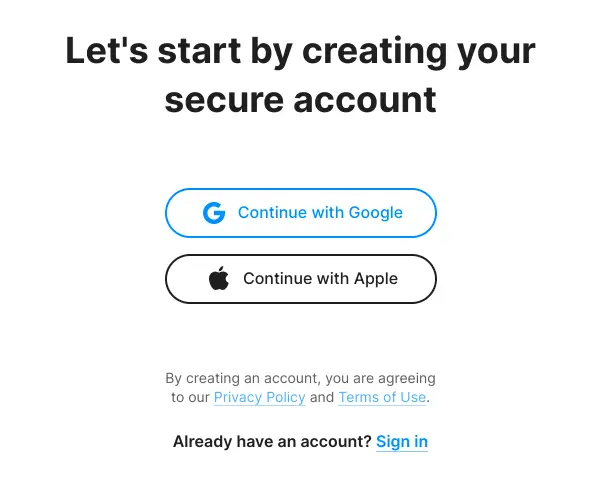
Pocketguard Accounts Page
You will then be guided to add your accounts. You can choose to have them sync, or you choose the track cash option that allows you to input the transactions yourself.
According to Pocketguard, “Your data is secured with 256-bit SSL encryption. That’s the same level of security as major banks. The more accounts you link, the smarter budgeting you have.” It is definitely a plus to know that your information is safe on this site.

Input Your Income In The App
Once you have input your accounts in Pocketguard, you will then input your income. You will input other information too, such as how often you receive this income and when each paycheck is expected (monthly, bimonthly, etc.).
You can also add multiple sources of income in this section. This is especially helpful if you are married and/or have many side hustles that you need to keep track of. You can also add or delete incomes at another point if anything changes in the future.
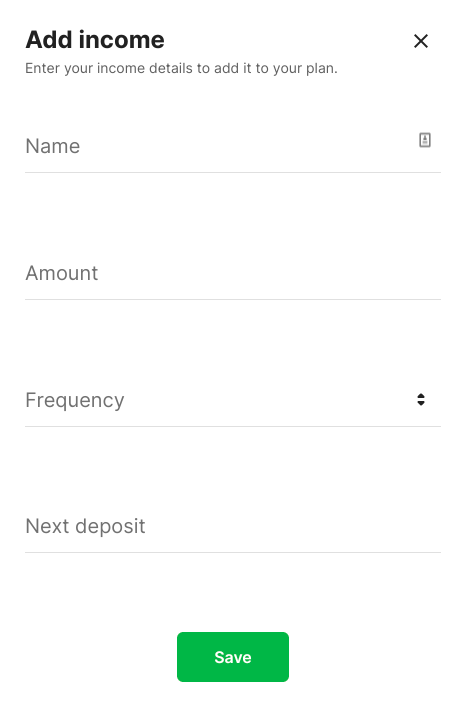
You can make changes to your income by going to the black bar on the left side of the page (on your computer), clicking on Overview, and then Next Paycheck. This is viewable on your app by scrolling down to Next Paycheck after you log in.
From here, you can view upcoming income and add incomes using the green plus button. In order to delete income, click on the income itself, then the three dots at the top of the page.
Here you will see options such as Edit Income, Mark as Inactive, Mark as Paid, and Delete Income. There is also an info button at the top of the main Income page that will help guide you to make any specific adjustments you need.
Next: Enter Your Bills In Pocketguard
After you have input your income, you are now ready to input bills. This is where having that information already available is super helpful.
Do your best to keep track of all the bills you have so that you aren’t scrambling to find money at the end of the month to cover a bill you forgot about!
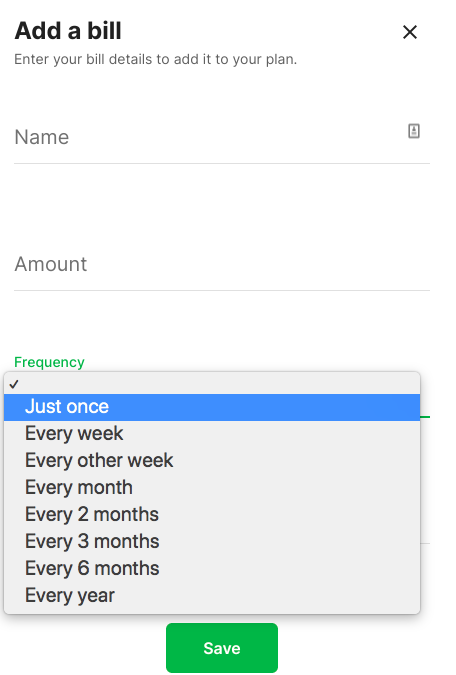
One of the features I greatly appreciate about this program is all of the frequencies available for bills.
It can be easy to forget bills that you only pay once or twice a year, but with this program, you will already have it listed and can plan to save up for it in your budget all year.
List the name, amount frequency, and when the bill is due in order to get set up. You will then be able to view these on your Overview page.
Pocketguard Lets You Create a Budget To See The Big Picture
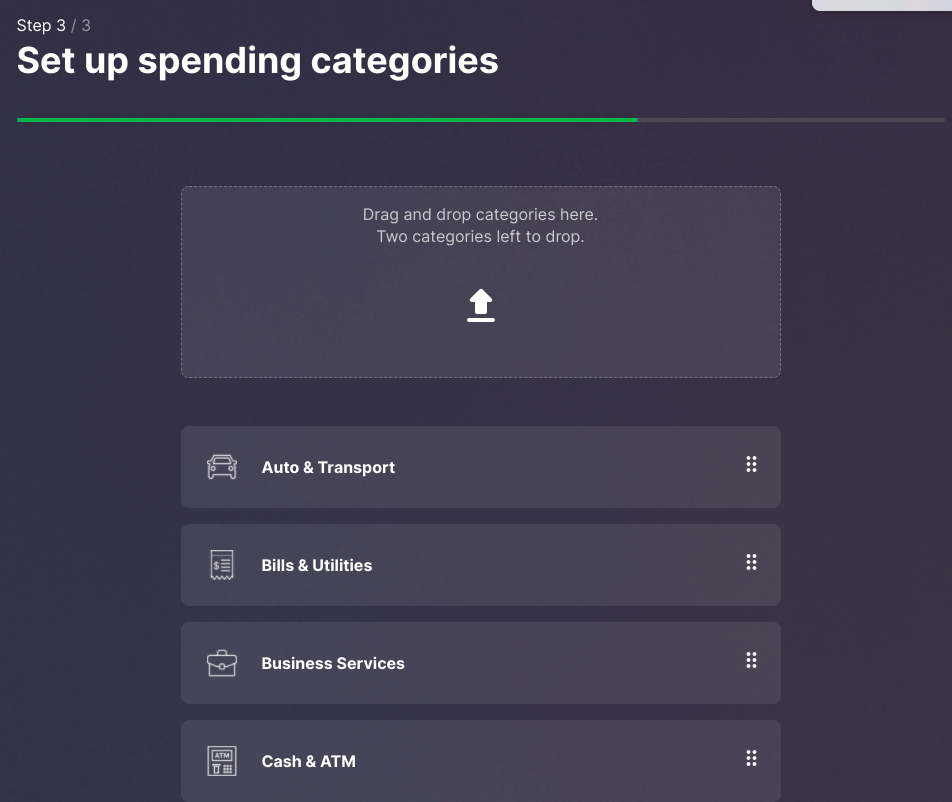
Once you have input your bills, you will be able to set up budget categories if you so choose. There are many options available in this step, which is great because it allows you to be as specific as possible with your budget.
As always, the more specific you are, the more probability that you will find success within your budget.
The Overview Page
You can always go back and reflect on the setup in your Overview page in the same area where it says “In My Pocket”.
Free/basic program users are allowed to create two category budgets, while Pocketguard Plus users are allowed an unlimited amount of category budgets. Using these category budgets is for things other than bills.
If you add bills into this section, it will double count them, which will throw off your budget completely.
More help is available in the FAQ section available in the menu at the top right of the main page. This looks like an outline of a person on the app and is located in the black pop-out settings bar on the website.
All of your budgeting is meant to allow you to view one thing – your In My Pocket number. This is based on a zero-based budget (meaning that your income minus your spending equals zero) and is meant to give you a sense of how much money you have left after paying your bills, saving for your goals, and spending on necessities such as food and transportation.
The In My Pocket (IMP for short) number will turn red if you have overspent and will remain green if you have underspent – which is the goal!
When you open up the app or website, this number (IMP) will be listed at the top of the overview – which gives you a very quick idea of where you stand with your budget.
Once you have completed these steps, you can move on to setting up goals, debt payoffs, and even your overall net worth if you so choose.
Overview: Setting Up Goals
The ability to set up a financial goal and automate its fulfillment is included in the free version of Pocketguard and is definitely a feature you (and everyone!) should take advantage of.
On the overview page or on the main screen of the app, scroll down until you see a section marked Goals. Once you click on it, click on the plus (+) sign on the top right, and this will allow you to start setting up a financial goal that fits into your lifestyle.
Setting goals can help you to reach your ideal financial situation faster – so be sure to take advantage!
First, Pocketguard will ask you what you are saving for. They give options such as a rainy day fund, dream vacation, retirement, or creating your own goal.
As always, be as specific as you can be so that you (hopefully) remain more motivated in pursuit of this goal.
For example, if you are saving for a rainy day, you may want to specify what that means to you (I can only spend this money on car and home emergencies that happen unexpectedly) and then hold yourself accountable for that.
Once you have named your goal, determine a target amount of money that will be needed for you to consider it complete.
You may need to do some research to finish this part.
For example, if you plan on taking a vacation, fully research expected costs of travel, hotel stay, food, transportation, and souvenirs/entertainment.
The more realistic you are about the cost of your goal, the more accurate your amount will be – and the less likely you will be to overspend. This applies to any of the categories as well – do your research for how much you will need for retirement, how much for emergencies, etc.
You can also designate a specific emoji to represent this goal if you choose. Anything to keep you motivated during this time!
Once you have completed this part, you will be asked where the money to save for this goal will come from.
You can autosave (a new feature that is not quite up and ready yet) or link it to an external account. The autosave will be an FDIC insured account that exists on Pocketguard.
Once you’ve chosen the account, you will be asked how much you would like to save each month.
Determine the right amount for you to save (consider that you will still need to pay bills, buy necessities, and have spending money prior).
Once you complete this step, it will automatically take this money from your In My Pocket. You should see it reflected there, and hopefully, after not too long, you won’t even miss it!
Unfortunately, if you do not pay for Pocketguard Plus, you will not be able to create more than one goal or work on a debt payoff plan through the app. The details of Pocketguard Plus are listed in the graphic below.
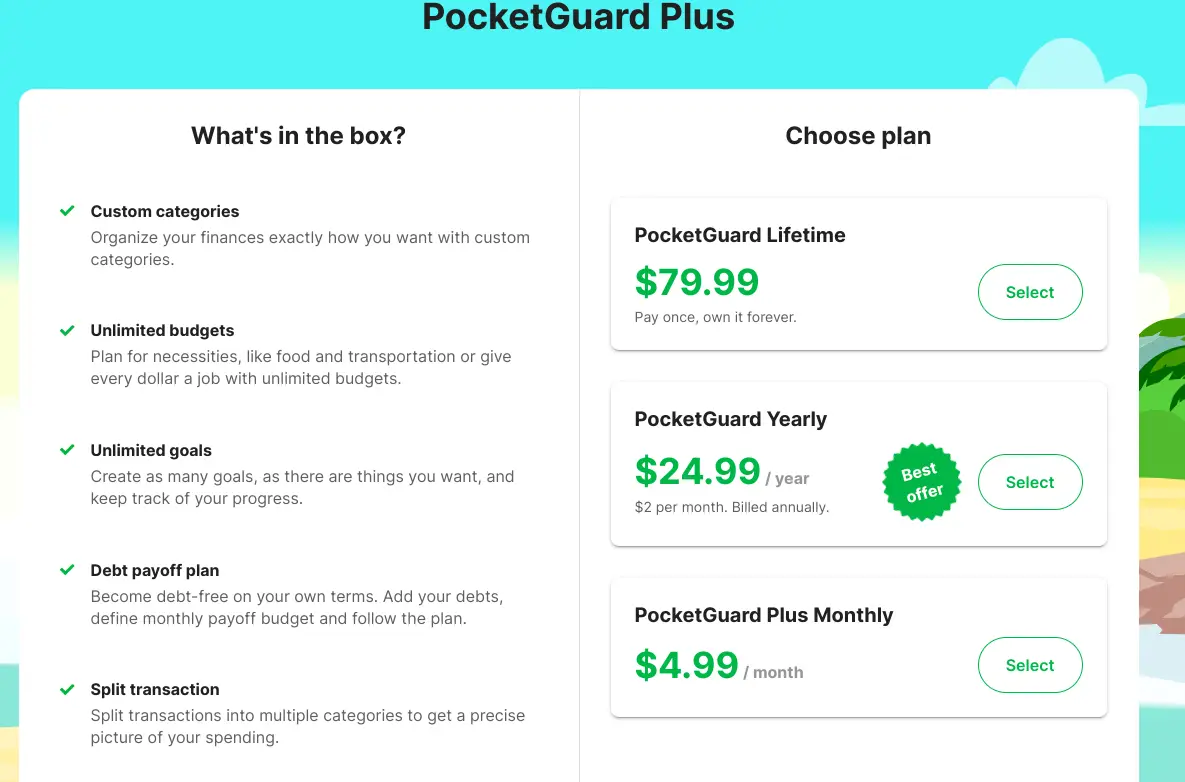
Strangely, the prices listed on the app are different. For Pocketguard Plus on the app, Lifetime Membership is $99.99, Monthly is $7.99, and Annual is $79.99. I reached out to Pocketguard, and this is what they had to say about the difference in prices:
“Indeed, we do have different prices on our mobile and web platforms. Prices are different due to App Store/Google Play fees. At the moment, the best offer is $24.99 for an annual subscription on the web app.
Mystery solved!
NOTE: “Once you upgrade the profile through the web app, you will be able to use all premium features in the mobile app as well.”
I would highly suggest taking advantage of this by using the web app to upgrade if you choose because then you will have access to the features in both the web and mobile app.
Pocketguard Plus offers the features listed above and the ability to export transactions, change transaction dates, extend transaction history, and cancel unwanted subscriptions.
I would definitely consider trying the upgraded version for at least a month (surely you can squeeze another $4.99 out of your budget), especially if you have debt. Using the debt payoff plan could help keep you motivated to pay it off in a more efficient way.
Overview: Debt Payoff In Pocketguard
The debt payoff plan is extremely helpful to anyone looking to rid themselves of debt. I truly believe that ridding yourself of debt is a great way to increase your income.
For example, you can use that money for something else rather than paying $100 to MasterCard each month. Of course, if you are using your credit card and paying it off in full every month, you can strongly consider that not as a debt but as part of your regular budget.
Take some time to figure out how this best makes sense to you and your accountability partner in your situation.
The debt payoff plan first asks you to link your account(s). Remember that this is a premium feature, so you will have to pay to set this up and use it. You will need to add a minimum payment, annual percentage rate, and budget so that Pocketguard can correctly estimate how much money you will have left “In My Pocket.”
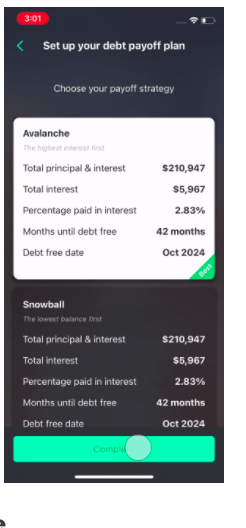
You will also need to determine what method of payoff is best for you – the debt snowball or the debt avalanche.
In both methods, you always make your minimum monthly payment.
In simple terms, the debt snowball uses motivation as its main tool. You list your debts in order from smallest to largest and then pay them off in that order. Quick payoffs hopefully translate to quick wins that keep you motivated to keep going!
The debt avalanche has you list your debts in order from largest interest rate to smallest. This uses the idea that you will save money over time by first paying off the debt with the most interest.
Here is an article from NFCC that gives a little more information – read through it to determine what is best for you. Again, in my opinion, the best way to pay off your debt is whatever way keeps you paying it off as fast as you can. This is different for everyone.
Use Pocketguard To Find Savings and Lower Your Bills
Pocketguard offers two other services that may be beneficial to helping you raise your In My Pocket (IMP) number.
It gives suggestions of companies you may pay bills to, such as Netflix or ADT, and offers to negotiate a cheaper monthly rate (bill) for you. This is done with the intention to help make sure that you have covered all your bases with your budget to make it as low as possible for yourself.
It boasts, “On average, users save $52 a month.” This may not seem like much, but over one year, that amount of money is $624. How much more debt could you pay off with that? How much closer could you be to a financial goal with that? It definitely wouldn’t hurt to look into it.
The Find Savings page in Pocketguard offers to help you “Crush Your Money Goals” with the following options:
- lower your bills
- cancel unwanted subscriptions
- manage loans
- manage insurance
- protect your family
- break into real estate investing
- protect the stuff you love
- get a lower auto insurance rate
- reduce your energy bill
- your job and side hustles
- savings accounts
- investing
- best deals and
- vacations.
As always, make sure the deal you are getting is truly in your best interest before you make the switch.
The last few pages offer a tip for the employees of Pocketguard, Contact Support, and to see your settings. These pages are where you can upgrade the platform you are on and find help if you are struggling with the app. When I have contacted them, they have responded in 24 hours or less.
What is great about Pocketguard?
Pocketguard is a great tool to help you keep track of your finances. There are many positive aspects of this site, such as helping you to see what you have leftover after budgeting, allowing you to set goals, and keep track of your debt payoff.
It is also free – mostly! You can get most of the benefits of the program without having to pay for it. However, if you choose to pay, do that through the web app so that you will not pay as much as you would through the mobile app.
Pocketguard is user-friendly and great for people who are busy and may not have time to track their budget often. It is offered as both an app and a website.
It also offers a blog, which gives tips and suggestions on how to best utilize your money and is a helpful way to keep yourself updated with financial education.
What challenges might you face with Pocketguard?
A challenge you may face with Pocketguard is determining whether or not to let it sync to your accounts. Pocketguard is safe, but it still may be something you need to discuss with your accountability partner.
If you do not connect your account, this may be beneficial as it allows you to track your own expenses. To do this, however, would take up more of your time.
Another challenge of Pocketguard is that it is not necessarily a traditional budgeting tool. It is not as easy to set up and view as some of the other budgeting apps because it does much of the budgeting and In My Pocket calculation for you.
This is nice if you are extra busy, but in my experience, the more involved you are with your budget, the better results you get.
What’s the bottom line?
In my opinion, Pocketguard is another great option as a resource for anyone looking to get their financial situation to its best. Using this program, you have the opportunity to make and track your goals and debt payoff while also keeping to a budget. It’s a win-win!
What questions should I consider before determining if Pocketguard is right for me?
If you are unsure of whether or not this is the program for you, here are some things to consider before deciding to start:
- Do I currently budget? Would my system be improved by using Pocketguard instead if I currently am?
- If I am not currently budgeting, would the Pocketguard format inspire me to do so?
- Do I have the time it takes to ensure that all of my transactions (automatically synced or not) are categorized correctly to ensure I stay on budget?
- Will I commit to using Pocketguard in order to keep my financial life on track?
- If I do not use this app, how will I ensure that I practice positive financial habits such as spending less than I make and striving to reach my financial goals?
Consider these questions on your own and then with a spouse or accountability partner. Figuring out the best method for budgeting for you is the best way to make sure that you will follow through with any budgeting program you begin. Remember that other budgeting apps are available, such as Every Dollar, GoodBudget, Mint, and You Need a Budget.
In conclusion, Pocketguard is another great option to consider when looking at how to best track your budget. It is a low-cost program, motivates you to only spend what is left, “In My Pocket” allows you to link and sync your accounts. Do your research, as you might be able to benefit from learning more about Pocketguard!